Quake
Singleplayer Guide Manual (PDF)
Like Doom and Doom II, id Software open-sourced the original Quake, which lets people write better ports with more understanding of how to make the game run.
Installation - Ironwail
- Download Ironwail. Extract it to a folder.
- Inside the folder, create a folder called
id1. - Place
PAK0.PAKandPAK1.PAKinto the folder. - Launch
ironwail.exein the root of the folder.
Syncing Saves
When you make a save, it's stored in your id1 folder that you created in the installation step. To sync using SyncThing:
- Create a folder sync that points to your
ironwailfolder. -
In the
Ignore Patternspane, add:!/id1 * -
Before sharing the folder using SyncThing, download and extract Ironwail on your second device.
- Share the folder using SyncThing.
- Set the folder's target to be inside your Ironwail directory. Example:
D:\ironwail
This will bring over the entirety of your id1 folder, including saves, .PAK files and music.
Music
The .PAK files don't contain the music for the game. It must be found separately. To add music:
- In the
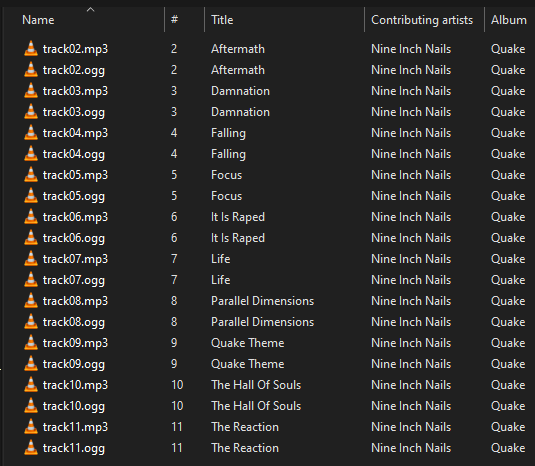
id1folder, create amusicfolder with either the soundtrack's.oggor.mp3files. - Your folder should look like this

The music folder should look like this inside:
The music should automatically start on level-start, or by launching ironwail.exe. If it doesn't, check the Options > Game > External Music option and make sure it's on.
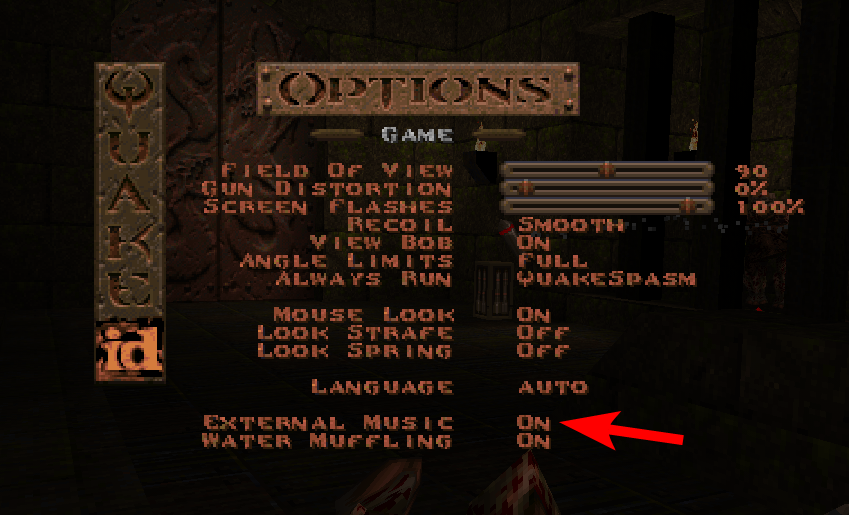
If you've already started a level, you may need to restart it after changing the External Music option.